
Review suspected fraud on your network in Hub
Use the Fraud agent page in Hub to find, sort and review the charges and wallet activity Monta's AI fraud agent suspects are fraud.
Updated 2 November 2026
This article is for operators who review fraud on their network. You will learn how to open the findings list, read a finding and narrow the list to what needs your attention.
The fraud agent is in early access. If you don't see Fraud agent under Analytics, your operator does not have access yet.
What the fraud agent does
The fraud agent reviews alerts on charges and wallets on your network. For each alert it writes a finding. A finding holds the agent's assessment, its reasoning and the context you need to act.
The page is read-only. Opening a finding does not change it.
Open the findings list
-
In the Hub menu, expand Analytics.
-
Select Fraud agent.
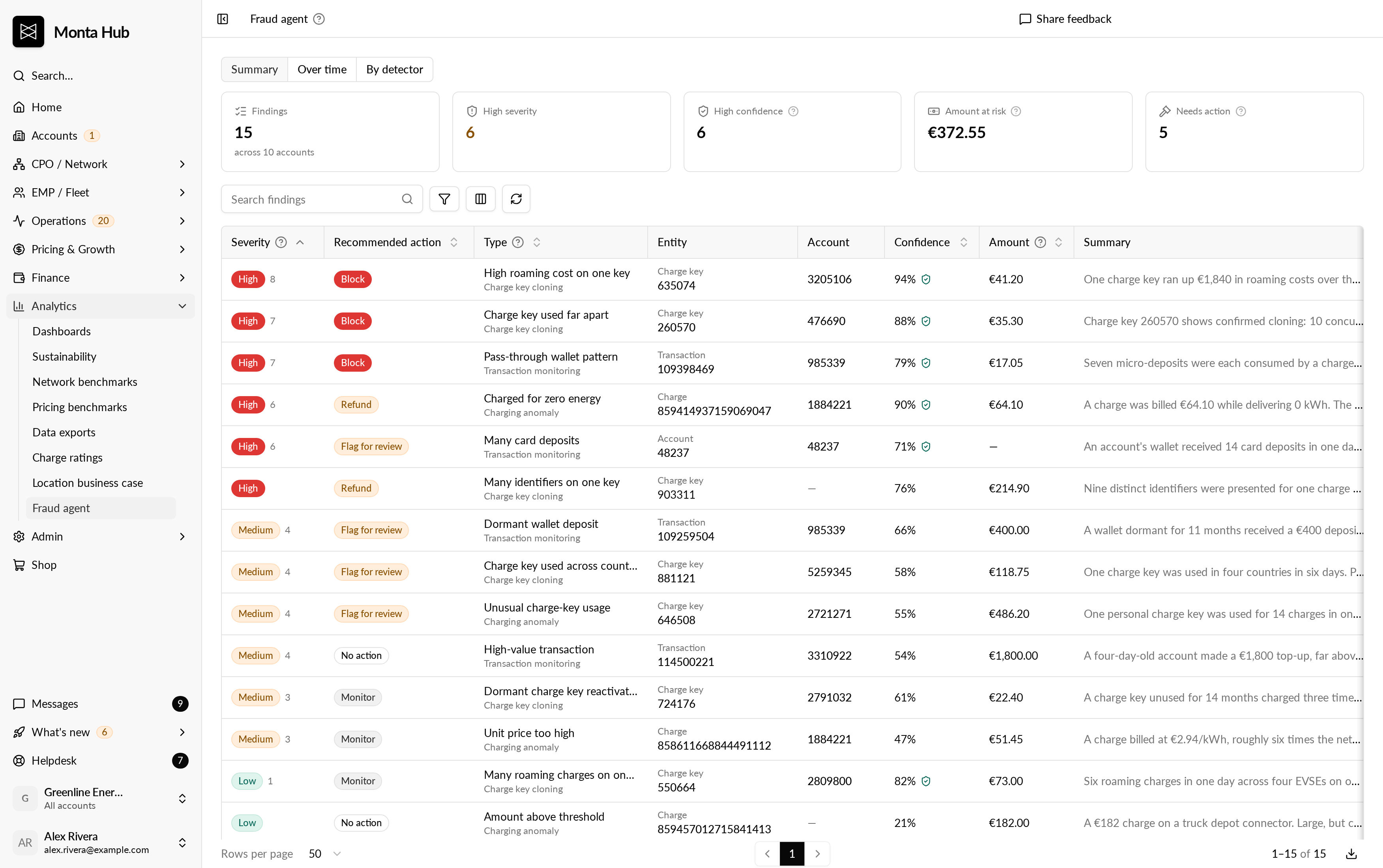
The page lists the findings for your operator. If there are none, you see "No fraud findings right now."
Read a finding
Each finding has these values:
| Value | What it tells you |
|---|---|
| Severity | How serious the finding is: High or Medium. A rank from 1 to 10 separates findings in the same band. |
| Confidence | How sure the agent is of its own assessment, from 0 to 100. |
| Likelihood | How likely the agent thinks it is fraud: High, Medium, Low or Negligible. |
| Recommended action | What the agent suggests: block, refund, flag for review, monitor or no action. |
| Detector | The type of check that raised the alert, such as charging anomaly or charge key cloning. |
Confidence and likelihood are different. Confidence is about the assessment. Likelihood is about the fraud.
Select a finding to open it. The detail view shows the agent's summary, the signals it weighed, the value that triggered the alert and the account, charge and location involved. Each account and charge links to its Hub page.
The address of an open finding is a link you can share with a colleague.
Work through the list
The list starts with the worst severity first, then the agent's rank, then its confidence. You can:
- Filter by severity (High or Medium), alert type, likelihood, detector and high confidence only.
- Sort by severity, recommended action, alert type, confidence, likelihood, amount or when the alert fired.
- Search by ID, account, recommended action or text in the summary.
- Export the current view to CSV.
The totals show the number of findings, how many are high severity or high confidence, and how many need action. The amount at risk is the charged total of high-severity findings. It is money under review, not confirmed loss.
Good to know
- The page shows the findings the fraud agent marks as visible to operators.
- If Hub says "This feature is turned off for your operator", ask an admin of your operator to check Data use consent.
- A finding is a lead for you to check, not a decision. You decide what to do with the charge, account or charge key.
- Select the help icon next to the page title for an explanation of the terms on the page.