
See a charge's fees and amounts in your own currency
Read the Transactions section of a charge in your operator currency, so you can check Monta's fees without converting them yourself.
Updated 5 November 2026
This article is for operators who view charges in Monta Hub and whose currency differs from the currency Monta receives its fees in. You will see every transaction amount in your own currency.
What you see
Monta can receive a fee in a different currency than the one your operator uses. Hub now shows these amounts in your currency instead.
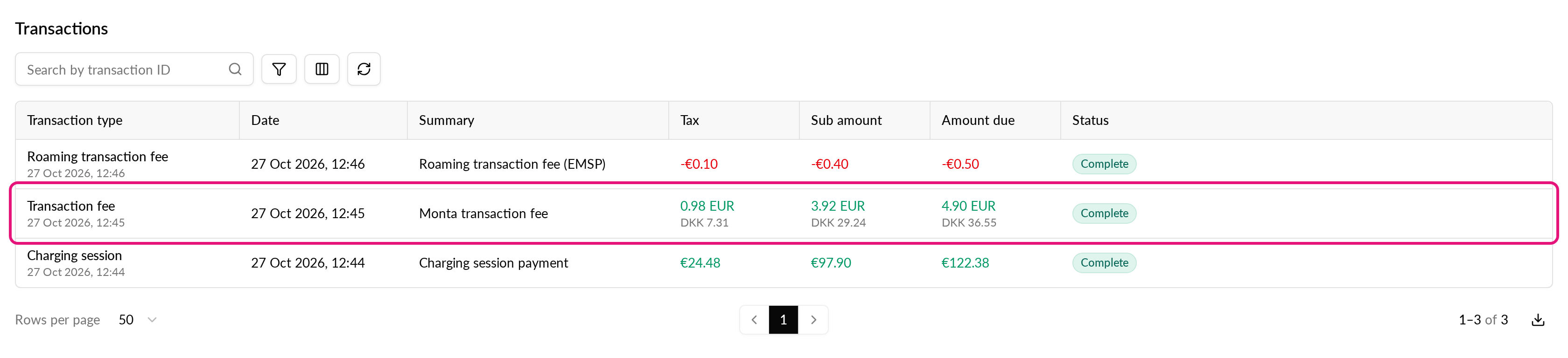
In the Transactions section of a charge, Hub shows the tax, sub amount and amount due in your operator currency. The amount in the other currency appears in muted text underneath.
For example, if your operator currency is GBP and Monta receives a fee in DKK, the row shows:
| Line | Example |
|---|---|
| Amount in your currency | 4.90 GBP |
| Amount in the other currency (muted) | 36.55 DKK |
Rows already in your currency look as they did before. A row whose other side is in a third currency also looks as before.
What you need
- Permission to view charges in Hub.
- Permission to view the charge's transactions. The muted amount in the other currency shows only when your role can also view the transactions of the paying or receiving account. Without that, the row shows the listed amount only.
Check a fee in your currency
-
In Hub, go to Operations and select Charging sessions.
-
Open the charge you want to check.
-
Scroll to the Transactions section.
-
Find the fee row. The top amount, in green or red, is in your operator currency.
-
Read the muted amount underneath to see the amount in the currency of the transaction.
You can now compare the fee with its percentage of the charge without converting it yourself.
Good to know
- Converted amounts are rounded to 2 decimals. For a currency with 3 decimals, such as KWD or BHD, the converted line shows 2 decimals. The listed amount keeps its full precision.
- Amounts use a dot as the decimal separator and no thousands separator, whatever your language.
- Hub converts only the first 50 transactions of a charge.
- If Hub cannot load the converted amounts, the table shows the listed amounts only.
- The transaction detail sheet also shows the Converted amount (incl. VAT) and the Exchange rate.