
Turn reimbursed charging on or off for many EVSEs at once
Make sure employees' home charging is reimbursed by their employer by switching reimbursed charging on or off for many EVSEs in one step, and reimburse charges made earlier.
Updated 23 November 2026
This article is for operators who run a home-charging reimbursement programme for employers. You will switch reimbursed charging on or off for many EVSEs at once in Monta Hub.
An employee's home EVSE is only reimbursed once its charging rule is marked as reimbursed. Until now only the driver could do that, in the Monta app. You can now do it for the whole selection.
Before you start
- You need permission to update EVSEs. Without it, you do not see the action.
- Only EVSEs owned by an employee's personal account, with an accepted reimbursement agreement, can be changed. Hub skips all others and shows the reason.
- If you do not see Set reimbursed charging, you do not have permission to update EVSEs for this operator. Ask an administrator of your operator to change your role.
Turn reimbursed charging on or off
-
Go to CPO / Network → Network → EVSE. You can also start from the Network tab of an account or a location.
-
Select the EVSEs.
-
In the bar at the bottom, choose More → Set reimbursed charging.
-
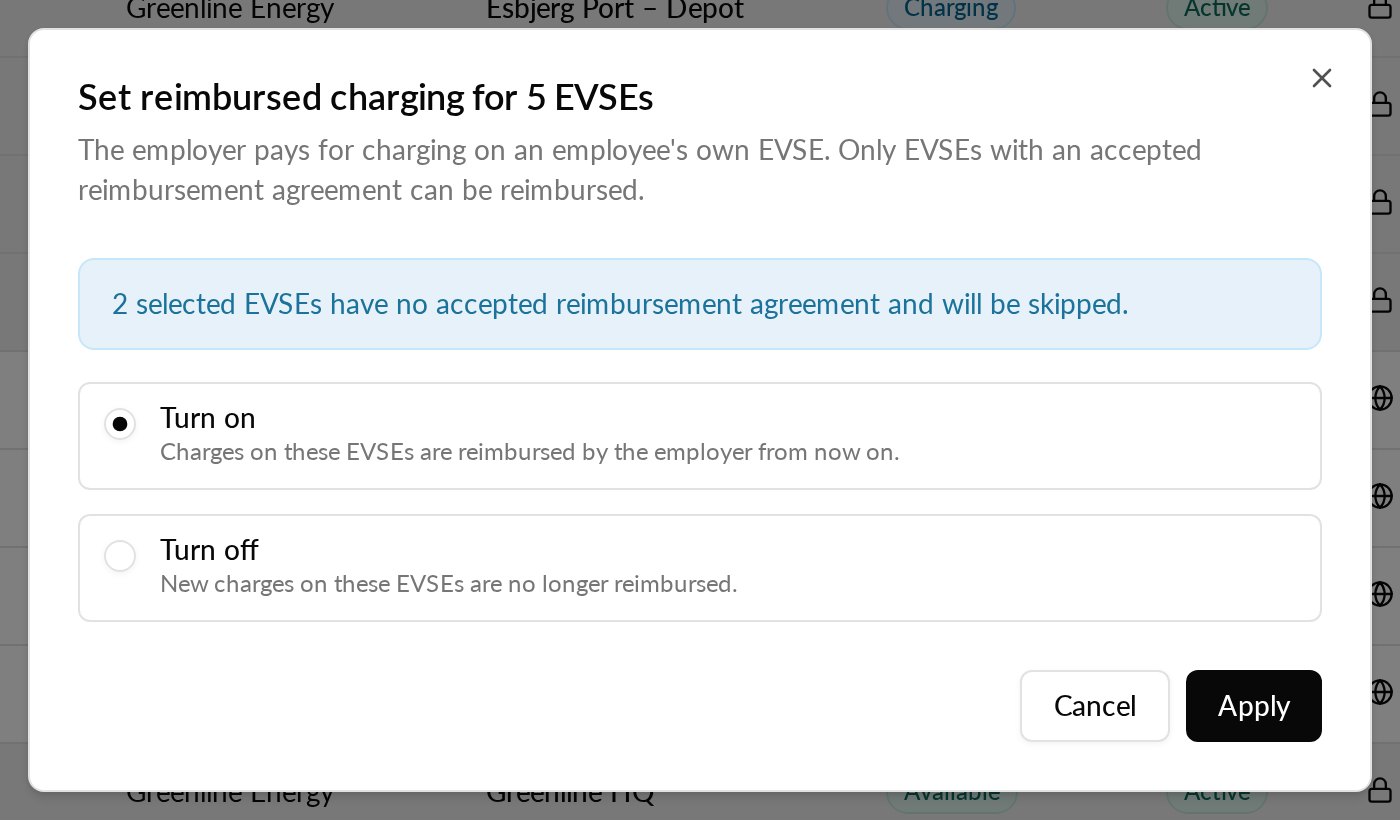
Choose Turn on or Turn off.
-
Check the warning at the top of the dialog. It says how many selected EVSEs have no accepted reimbursement agreement and will be skipped.
-
Select Apply.
When it finishes, Hub lists every EVSE as Done, Skipped or Failed. A skipped EVSE shows the reason.
What each option does
- Turn on: Charges on these EVSEs are reimbursed by the employer from now on. Hub marks the owner's charging rules on the EVSE as reimbursed. If the owner has no rule on the EVSE, Hub creates an active, instant rule for the owner. Rules that other users created are not changed.
- Turn off: New charges on these EVSEs are no longer reimbursed. The rules stay, so charging behaviour does not change.
Why an EVSE is skipped
- It is not owned by a personal account.
- It has no accepted reimbursement agreement.
- The EVSE owner is not covered by the reimbursement.
- The reimbursing account is frozen.
- The EVSE does not support charging rules.
If an EVSE fails
A failed EVSE stays selected. Close the results, open Set reimbursed charging again and select Apply to retry it. When every EVSE is done or skipped, Hub clears the selection.
Reimburse past charges
Turning reimbursed charging on only covers new charges. If an employee charged for weeks before the EVSE was set up, they paid for those charges themselves. Reimburse past charges moves those earlier charges to the employer, for many EVSEs at once.
If you do not see Reimburse past charges next to Set reimbursed charging, it is not switched on for your operator yet. You need the same permission to update EVSEs, and the action is offered on the same three lists.
-
Select the EVSEs, as in the steps above.
-
In the bar at the bottom, choose More > Reimburse past charges.
-
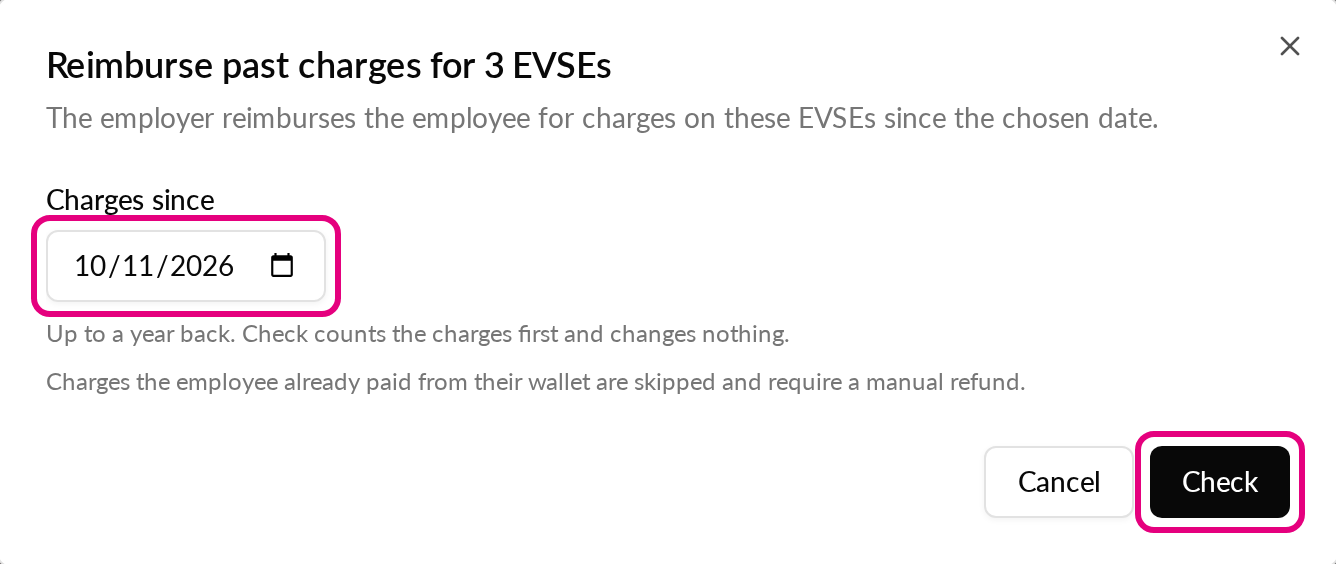
In Charges since, pick the first day to reimburse. The default is 30 days ago, and you can go back up to 363 days. The run covers every charge from that day until now.
-
Select Check to see what would happen first. Hub starts a check for each EVSE and shows Checking until it finishes. Then it shows how many charges would be reimbursed, or why the EVSE is skipped. Nothing changes and no money moves.
-
Select Reimburse to run it. Hub lists every EVSE as Done (with the number of charges reimbursed), Skipped (with the reason) or Failed.
A run reimburses at most 50 charges per EVSE, newest first. An EVSE with more charges says More charges remain. Select Continue to run the next charges for those EVSEs over the same window. Charges that are already reimbursed are skipped.
Hub applies the same rules as Set reimbursed charging: the EVSE needs an accepted reimbursement agreement that covers its owner, a personal account, and a reimbursing account that is not frozen. Hub skips any other EVSE and shows the reason. Only one run can be active for an EVSE at a time. If you start a second run too quickly, the EVSE shows Failed. Select Reimburse again to retry it.
If an EVSE failed, some charges could not be reimbursed, or charges remain, Hub keeps the selection so you can run it again. Otherwise closing the dialog clears the selection.
Undo a run
Right after you reimburse, select Undo to take back the runs you just made. What happens depends on where each reimbursement is:
- Waiting for payout: Hub rejects the reimbursement, and the employee pays for the charge again.
- Already paid out: Hub requests a clawback. It is collected from the employee's wallet later.
- In an approved payout: Hub refuses the undo. You need to handle these charges by hand.
Hub shows how many charges were rejected, had a clawback requested, or were refused, for each EVSE and in total.
See what a run did
Every run, its charges and any undo stay on the EVSE. Open the EVSE and go to the Pricing & access tab. The Reimbursed past charges card lists the runs, newest first. Open a run to see each charge, its result and payout state, and the progress of any clawback. You need permission to update the EVSE to see this card.
Reimbursed charging can turn on by itself
Once it is switched on for your operator, reimbursed charging turns on by itself when an employee accepts a reimbursement agreement. You do not need to use Set reimbursed charging for those EVSEs.
Good to know
- Turn on and Turn off apply to new charges from now on. To reimburse charges that already happened, use Reimburse past charges.
- Every change is recorded in the EVSE's activity log.
- To manage one driver's rule, see Set up a driver's charging rule on an EVSE in Hub.