
Set up a driver's charging rule on an EVSE in Hub
Create, pause or delete a driver's charging rule on an EVSE, so the driver's charging starts on plug-in and an employer can pay for it.
Updated 5 November 2026
This article is for operators who set up charging for drivers, for example an employee's home charging that an employer reimburses. You will create a charging rule for a driver on an EVSE in Monta Hub.
A charging rule starts a driver's charging automatically when they plug in. Each rule belongs to one driver.
Before you start
- You need permission to update EVSEs. The EVSE's account owners and admins can also manage rules on their own EVSE.
- The EVSE must belong to an account. Without an account there is no driver to create a rule for.
- The EVSE hardware must be able to start charging by itself. Rule types that the EVSE cannot run are shown but disabled.
- If you do not see the New button, you need permission to update EVSEs.
Create a charging rule
-
Open the EVSE and go to Settings → Configuration.
-
Under Operational controls, select Charging rules.
-
Select New.
-
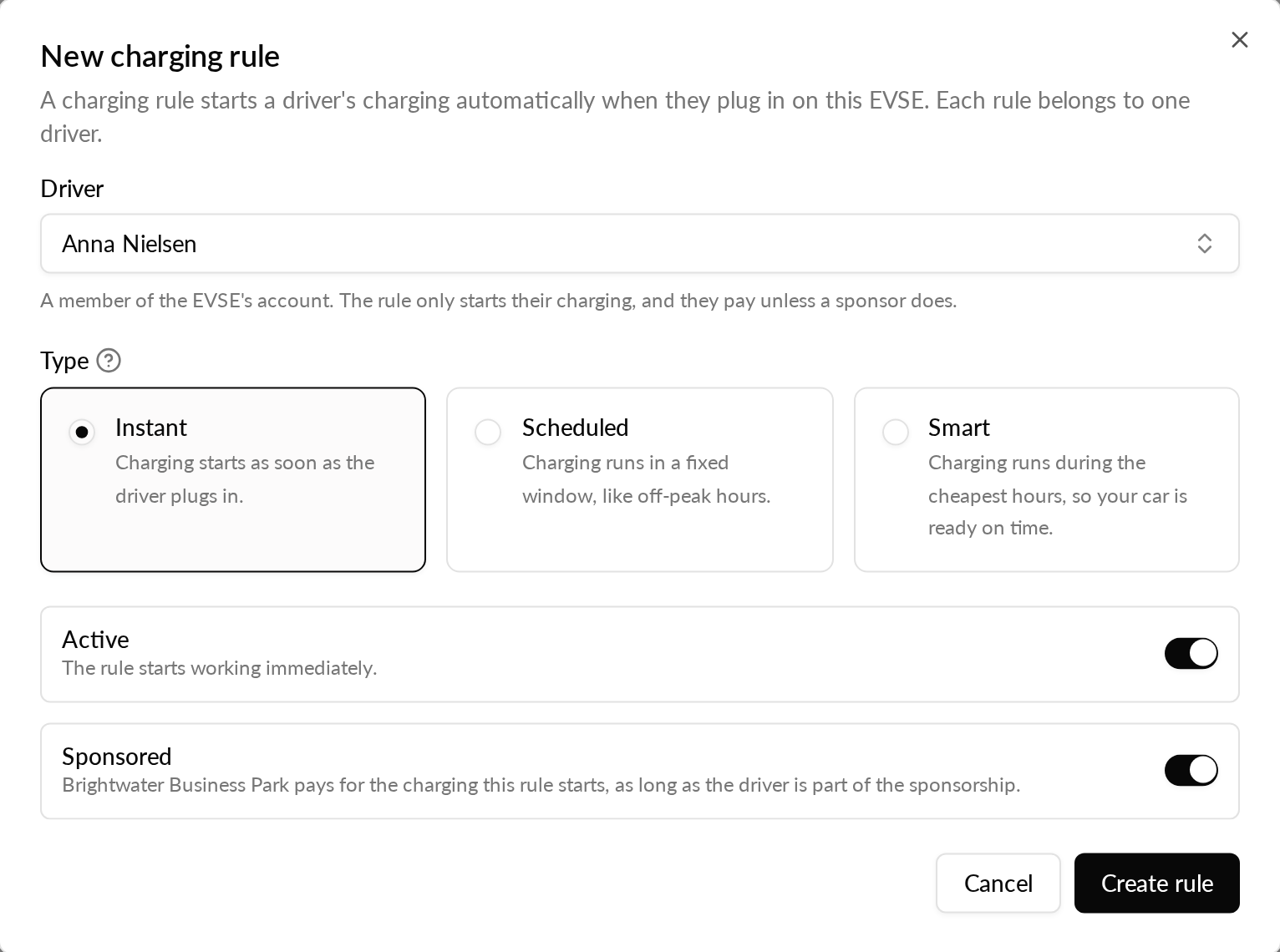
In Driver, search by name or email and pick a member of the EVSE's account.
-
In Type, choose Instant, Scheduled or Smart.
-
Keep Active on if the rule should work immediately.
-
Keep the reimbursement switch, the one after Active, on if the employer should reimburse the charging.
-
Select Create rule.
The rule appears in the list with the driver, the rule, who pays and whether it is active.
The defaults suit an employee's home charger: an active, instant rule. The driver plugs in and charging starts.
Rule types
| Type | What it does |
|---|---|
| Instant | Charging starts as soon as the driver plugs in. |
| Scheduled | Charging runs in a fixed window, such as off-peak hours. |
| Smart | Charging runs during the cheapest hours, so the car is ready on time. |
Smart rules need smart charge turned on for the EVSE under Operational controls. The driver's vehicle must also be connected to Monta.
Who pays
The Paid by column shows who pays for the charging a rule starts.
When you keep the reimbursement switch from step 7 on, the reimbursing account pays, as long as the driver is part of the reimbursement agreement. Otherwise the driver pays, and the list shows Driver pays.
Monta Hub does not create a reimbursed rule that the reimbursing account would not pay for. It shows a reason instead, for example:
- The EVSE has no accepted reimbursement agreement.
- The EVSE does not belong to a personal or private account.
- The reimbursing account is frozen.
- The reimbursement agreement does not cover this driver.
Turn off the reimbursement switch, or fix the cause, and create the rule again.
A reimbursement agreement can end after a rule was created. The list then marks the rule as reimbursed, but the driver pays.
Pause or delete a rule
- To pause or resume a rule, switch Rule active in its row.
- To remove a rule, select Delete rule in its row, then confirm with Delete rule.
After you delete a rule, the driver's charging no longer starts automatically on this EVSE. The driver can still start it from the Monta app.
Good to know
- Drivers still see their rules in the Monta app and can change them there.
- Every change is recorded in the EVSE's activity log.
- To switch reimbursed charging on or off for many EVSEs at once, see Turn reimbursed charging on or off for many EVSEs at once.