
Get daily reminders when a subscription has no payment card
Explains the daily reminder email that goes to accounts whose subscription is paused because no payment card is on file, and how to stop it by adding a card.
Updated 2 November 2026
This article is for operators who sell subscriptions to accounts or on charge points. It explains the daily reminder email that asks an account to add a payment card, and who receives it.
When the reminder is sent
A subscription cannot be billed without a payment card. When an account has a subscription that is paused because no card is on file, Monta sends that account a reminder email once a day.
The reminder:
- Is sent at 09:00 in the account owner's local time.
- Is sent once per paused subscription per day.
- Names the subscription and the account.
- Contains an Add payment card button.
The reminders stop when the subscription is no longer paused for a missing payment card, for example after a card is added.
Who receives the reminder
The email goes to the account owner and to the members who have the Manage account wallet permission, as long as their email address is verified.
The reminder is not sent for:
- Frozen accounts.
- Charge point subscriptions that another account pays for.
- Subscriptions that are paused for a reason other than a missing payment card.
What the recipient does
The Add payment card button opens the right place for the type of account:
| Account type | Where the button leads |
|---|---|
| Personal account | The subscriptions list in the Monta app |
| Any other account | The Subscriptions tab under Settings on the account's page in Hub |
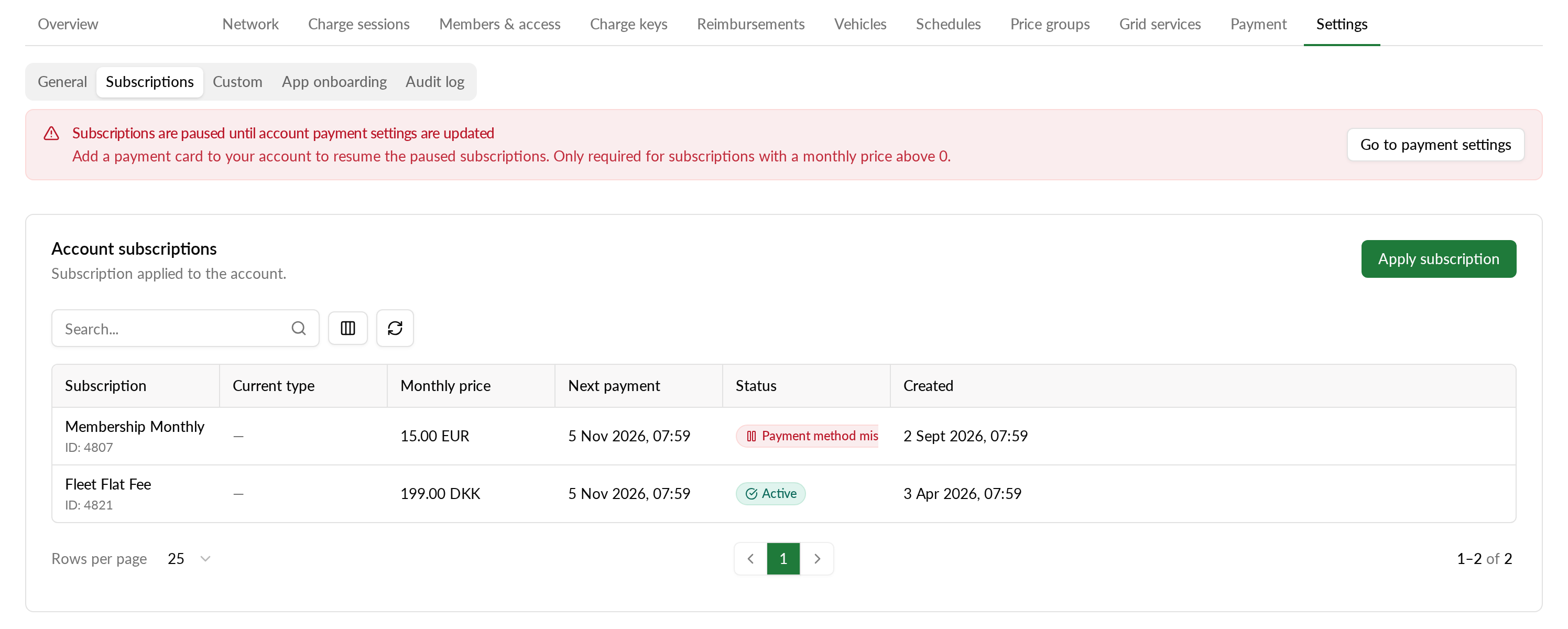
To end the reminders:
- Select Add payment card in the email.
- Sign in if you are asked to.
- On the account's Subscriptions tab under Settings, select Go to payment settings in the banner.
- On the page that opens, next to No payment card added, select Add payment card and enter the card details.
Once the account has a card, the subscription can be billed and the daily reminders stop.
Update the Monta app if the link opens the home screen instead of the subscriptions list.