Catch and resolve network issues faster with alerts
Alerts that know who to wake up, what just happened, and what to do next. Across the charge point, the driver, and your support team, in one queue.




See every alert in one place
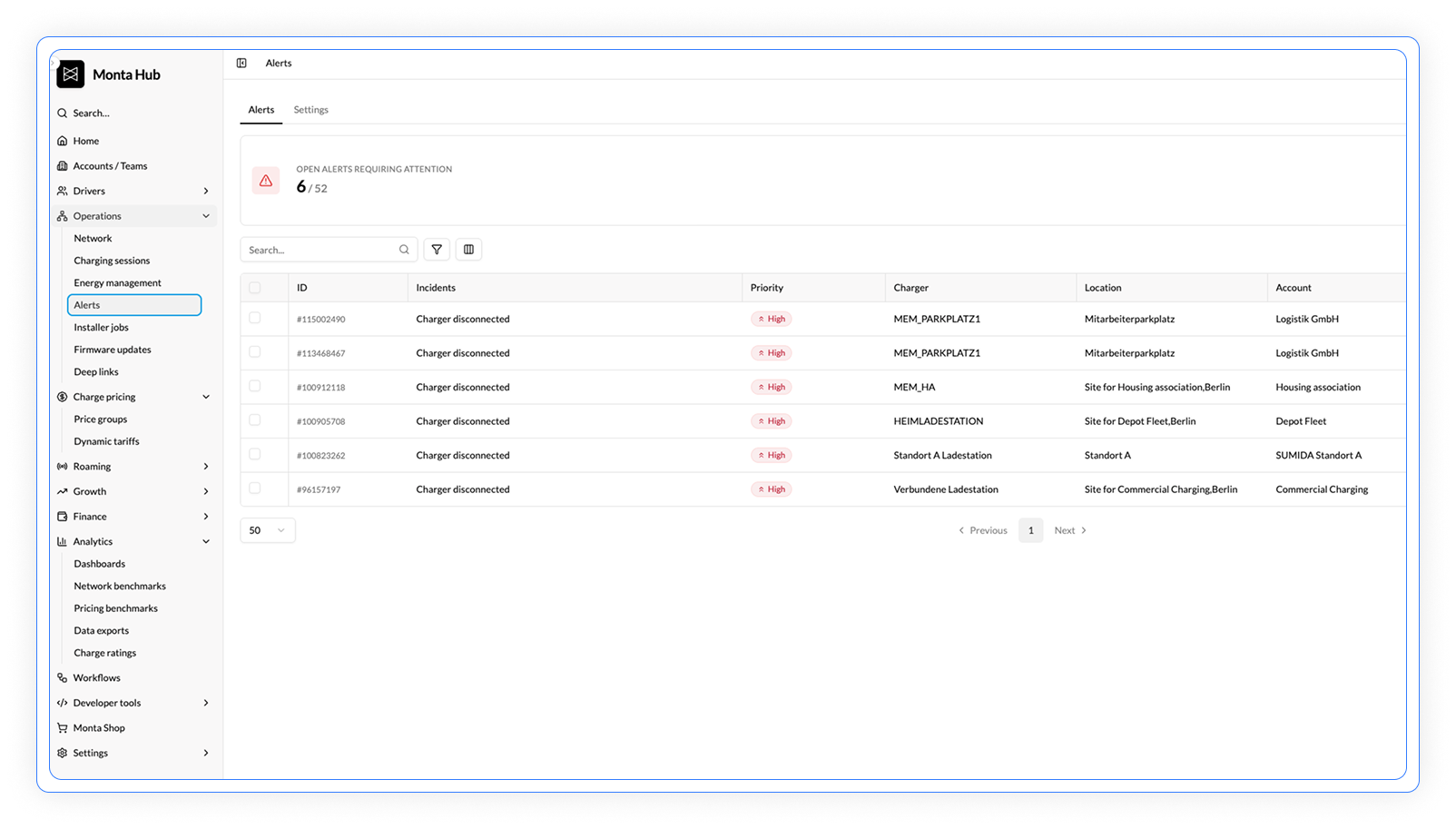
One dashboard. Search across every alert. Filter by priority, reason, source, or date. Bulk-resolve. Click any alert to jump straight to the charge point, team, or site it belongs to. The default view surfaces what’s open and needs attention, separating actionable alerts from the ones Self-heal already cleared.
Notifications ship by email today. The full alert object is available through the API for operators piping into their own paging stack.
Three sources feed every alert
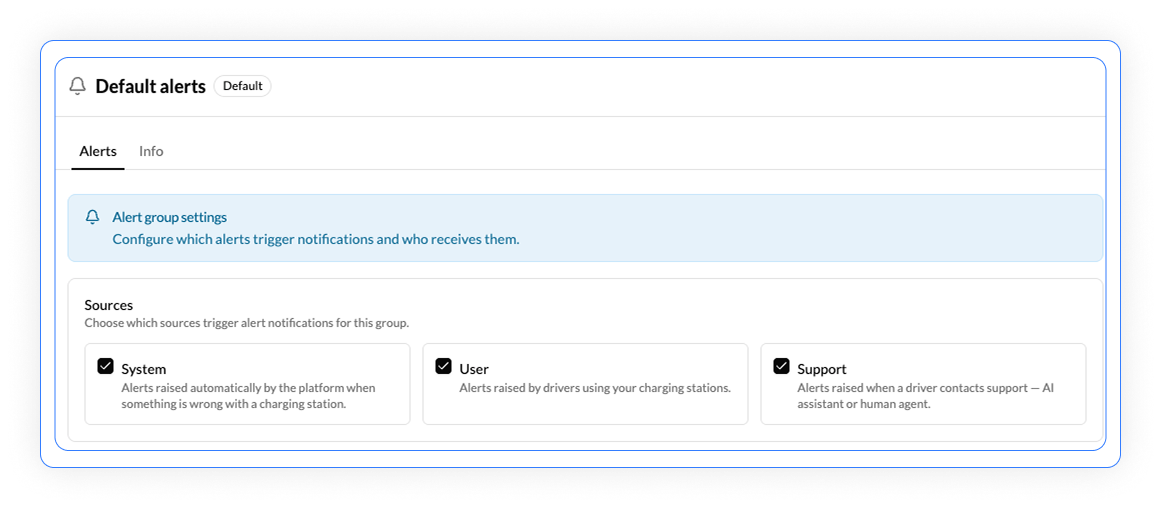
System.
Automatic detection: disconnects over 15 minutes, error states, OCPP security events, failed sessions piling up. 17 pre-built alert types, ready out of the box.
User.
Drivers flag issues in the app: blocked by another car, broken connector, wrong availability, payment problems. Self-help resolves some before they reach your queue.
Support.
If AI Driver Support or an agent can’t resolve it on the call, an alert routes to you with context attached — what was reported, what was tried, where it got stuck. Operators can also push alerts in via API from their own helpdesk.
How Monta helps solve alerts
Built for reliability at scale
FAQs
Self-heal is Monta’s automated algorithm. It runs at the hardware level, tuned by Monta per brand, model, and firmware based on cross-fleet data. You don’t configure it; it just runs.
Workflows are yours. They run at the charge point, site, or team level on rules you define: reboot conditions, escalation paths, who gets notified, when to dispatch field services. Self-heal handles the standard hardware issues. Workflows handle your operational rules.
The Default group fires on the high-impact stuff out of the box: charge point disconnected for 15+ minutes, charge point in error state, OCPP critical security events, multiple failed sessions in a short window, and driver-support escalations.
Customise when you need different SLAs per site (a depot needs faster alerts than a multi-family site), different notification recipients (the installer at Bristol vs. Manchester), or different rate limits to keep notifications clean.
Not as native integrations today but this is on our roadmap. Alerts ship through email or webhooks, with the full alert object available through the API. Operators that want to pipe data into other 3rd party systems can do it through Monta’s extensive APIs or webhook layers.
AI Driver Support sits on the driver-side. When a driver calls support, the AI handles straightforward issues (stuck cables, restart requests) without operator involvement. When it can’t, certain categories become Alerts. For example, if the agent determines it’s hardware issues, or something else “severe” that needs attention from the operator. When the AI agent cannot resolve the call, it forwards them to human support. Monta’s human driver support team can manually escalate support-cases as alerts as well.
The result: most driver-side issues never become alerts you have to handle. The ones that do come with context already attached.
Self-heal handles the OCPP-recoverable issues. When the charge point doesn’t respond (hardware failure, network issue, physical fault), the alert stays open in your queue.
That’s where Workflows take over: notify the installer, escalate to a manager, dispatch a work order to your field service system. If it gets all the way through that chain unresolved, Monta support is on the phone.
Yes. Drivers using the Monta app or any Monta-powered branded experience have self-help actions built in (release a stuck cable, retry a session, troubleshoot a connector). Most user-reported issues get resolved by the driver before they ever become an alert routed to your team.
Less downtime, fewer dispatches, fewer tickets
Self-heal clears OCPP-recoverable issues before operators notice. Workflows take care of the rest on the operator’s own terms. Monta operators hit 97% session success at network scale.