EV charging network automation for charge point operators at scale
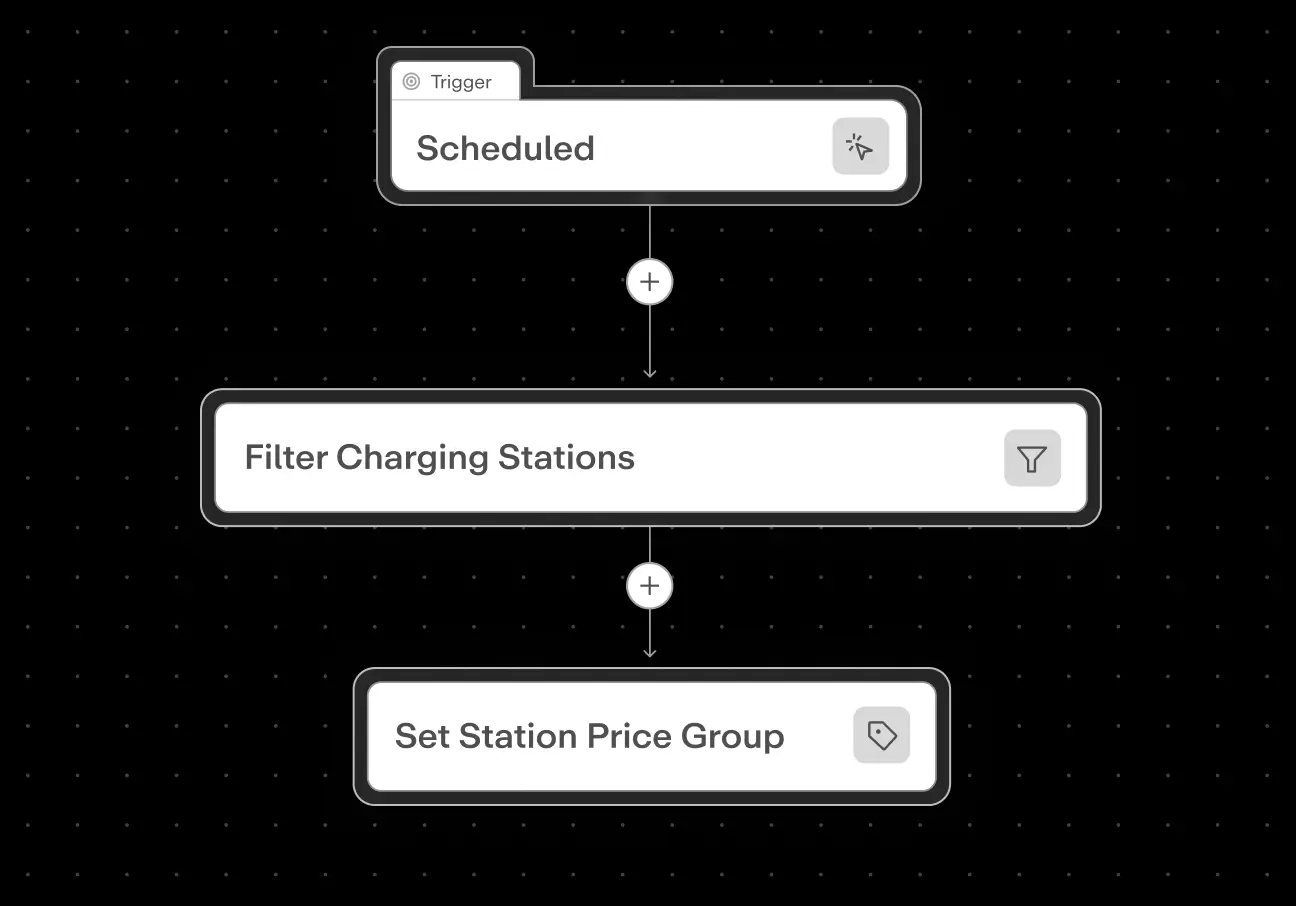
Workflows turns the repeat tasks that consume your operations team into automations that run themselves. Scheduled, auditable, and consistent across every charge point you manage.
Every manual action on your network is a task that scales with the number of charge points you manage
With Monta
- Build a workflow once: pick the OCPP key, set the value, select the target stations
- It runs across your entire network without anyone at a keyboard
Without Monta
- Pushing an OCPP config change means an engineer clicking through stations one by one
- Hoping nobody makes a mistake on station 47
With Monta
- Operators build and run Workflows themselves in Monta Hub, no developer needed, no ticket filed
- No waiting for an engineer to have capacity
Without Monta
- A routine network reboot or config enforcement requires a support ticket, a developer, or both
- Creating a bottleneck on every repeat task
With Monta
- Scheduled and recurring triggers fire automatically, at midnight, weekly, or on a custom cron
- The workflow runs whether or not anyone is watching
Without Monta
- A price change that needs to land at midnight on the 1st requires someone to stay at a keyboard
- Or remember to do it the next morning
With Monta
- Every run is logged with per-step status, timestamps, and error details
- Watch it run live or review the full history afterwards
Without Monta
- When something goes wrong, there is no record of what ran or which stations were affected
- Or whether the action completed
Automate the repeat work to reduce operational overhead
Roll out a price update across your network at once
- Every charge point using that price group switches at the same second
- No rollout window, no drift across sites
- Built for contract start dates, seasonal pricing, or promotional periods
Set a reboot schedule that runs itself
- Clears stuck sessions and memory drift automatically
- Weekly, monthly, per-site, or per-model – your schedule
- Runs without anyone at a keyboard
Update OCPP config across every charger
- Pick the OCPP key, set the value, choose the chargers
- No per-station copy-paste – push to all in one run
- Reinforces the value every time a station reboots
Bulk assign price groups across your network
- Select a team and pick a station filter
- Assigns public and roaming price groups in one run
Define your target charge points once, reuse across actions
- One filter node feeds multiple actions
- Reboot, config update, and price change from a single selection
Turn manual tasks into scheduled workflows
Three ways to run a workflow. You decide which fits.

Trigger on demand from the Hub
Click “Trigger” to start a run immediately. The right path for one-off changes or for testing a workflow before enabling it on a schedule.
Runs on a cron schedule in your timezone
Set a cron expression and timezone. The workflow fires automatically, weekly reboots, monthly config enforcement, overnight updates, without anyone managing the schedule.
Fire once at a specific date and time
Set an exact datetime and timezone. Ideal for contract start dates, planned tariff changes, or one-time firmware rollouts at a scheduled maintenance window.
For the teams managing operations at scale

Network operations
Run network-wide maintenance without an engineer on standby
- Reboots, OCPP config enforcement, firmware rollouts, all on a schedule
- No ticket, no one-by-one clicking
- No late-night on-call for routine maintenance

IT & Engineering
Build once, hand over to operations – no scripting required
- Replaces one-off scripts and support tickets
- Build in the Hub, test with a manual trigger
Hand to your operations team to run independently
FAQs
No. Workflows is built in MontaHub using a visual editor. You pick a trigger, select an action, choose the chargers to target, and set your schedule. No scripting, no API calls, no developer involvement required. Operations teams build and run workflows independently.
Yes. Every workflow can be triggered manually before enabling it on a recurring or scheduled basis. You run it once, check the audit log to see what was applied to which chargers, confirm the result is correct, and then activate the schedule. This is the standard path for building confidence before a network-wide rollout.
The workflow runs on all reachable chargers and logs the outcome per station. Offline chargers are noted in the audit log. For OCPP configuration actions specifically, the value is re-enforced the next time that charger comes back online and reboots, so connectivity gaps don’t create permanent drift.
The audit log shows exactly which chargers were updated, which were skipped, and why, so your team always has a clear picture of actual coverage.
Yes. Workflows operates at the Monta layer, not the hardware layer, so it works across every brand and model connected to your network. A single price update workflow can target chargers from different manufacturers at different sites simultaneously. No need for brand-specific tools or separate configurations per model.
Yes. Every workflow run produces a full audit log, which chargers were targeted, what action was applied, which succeeded, which were skipped, and the timestamp of each event. This makes Workflows auditable by default, which matters for operators who need to demonstrate config consistency for compliance or enterprise customer SLAs.
Yes. Actions can be chained in the visual editor. A single workflow can reboot a set of chargers, apply an OCPP configuration update, and assign a new price group, all from a single station filter, in one run. Outputs from one action can feed inputs to the next, so you build complex maintenance sequences without writing a single line of code.
There is no hard limit on the number of active workflows. Large operators typically run separate workflows per use case, one for weekly reboots, one for nightly OCPP enforcement, one for seasonal pricing, each on its own schedule and targeting its own set of chargers. They run independently and don’t interfere with each other.