Build EV charging into your product
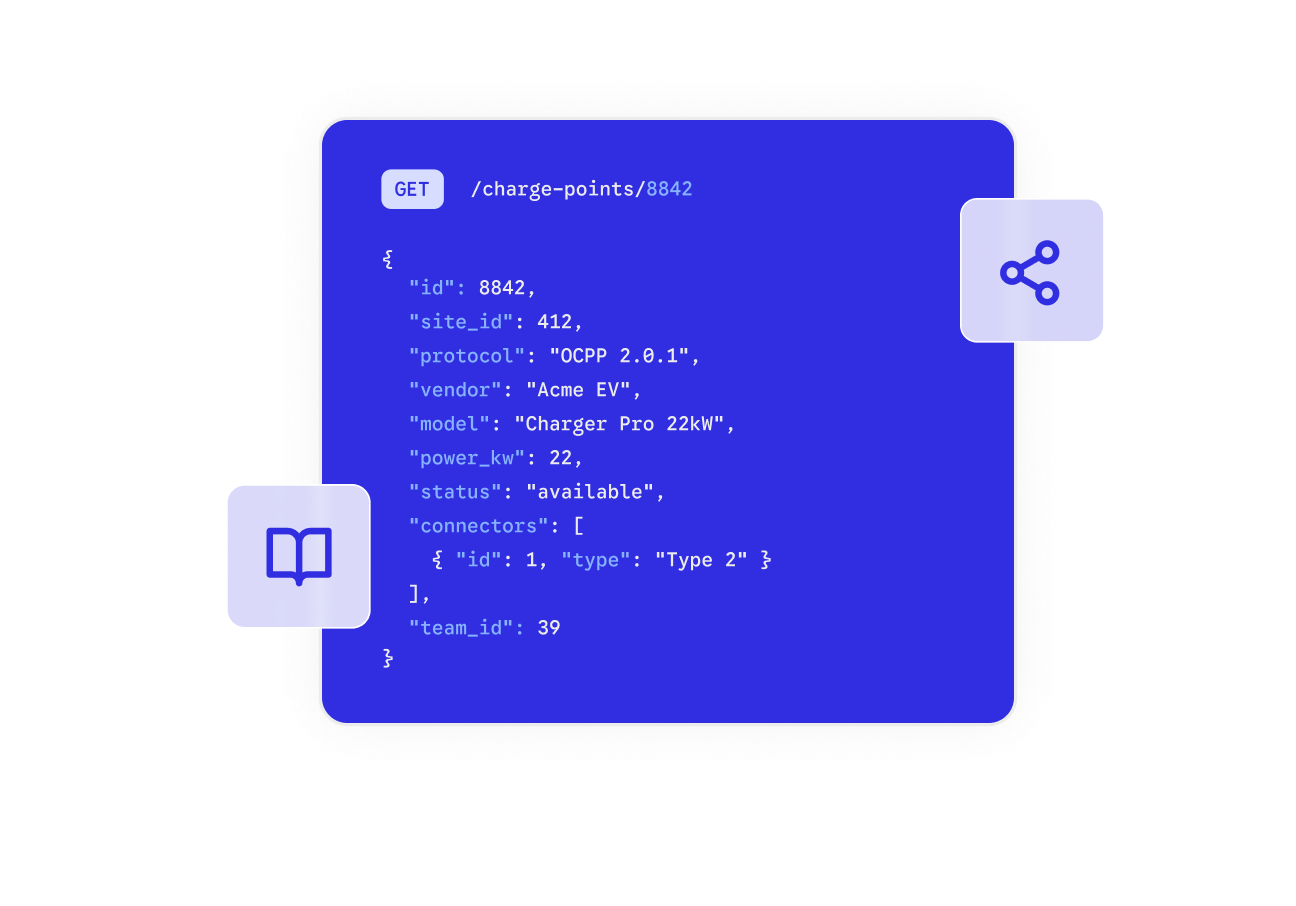
Everything you need to build EV charging into your own product: one documented API, MCP servers for your AI tools, and open-source OCPP libraries you can run without any hardware.
One API, built to build on

Fleets
Onboard and manage fleet charging: create drivers, assign charge access, and pull session and cost data through one API.

Operators
Run your charging network: create and configure charge points, set pricing, schedule availability, and watch diagnostics across your estate.

Data and CRM
Sync charging with your systems: import and export drivers, sessions, and transactions into the CRM, ERP, and billing you already run.

Home and smart devices
Automate home charging with the free Public API, connecting home charge points to smart-home tools for solar, schedule, and price-based charging.
See the API, not just the promise
Authenticate once, then read and control charge points with a few calls. Versioned, documented, and the same surface that powers our infra.
curl --request GET \
     --url 'https://partner-api.monta.com/api/v1/charge-points?page=0&perPage=10&includeDeleted=false&includePublic=false' \
     --header 'accept: application/json' \
     --header 'authorization: Bearer <token>'
import montaPartnerApi from '@api/monta-partner-api';
montaPartnerApi.auth('<token>');
montaPartnerApi.getChargePoints({page: '0', perPage: '10', includeDeleted: 'false', includePublic: 'false'})
.then(({ data }) => console.log(data))
.catch(err => console.error(err));import requests
url = "https://partner-api.monta.com/api/v1/charge-points?page=0&perPage=10&includeDeleted=false&includePublic=false"
headers = {
"accept": "application/json",
"authorization": "Bearer <token>"
}
response = requests.get(url, headers=headers)
print(response.text)More than an API
MCP servers for your AI tools
Connect Claude, ChatGPT, or Copilot to charging over the Model Context Protocol. Three servers cover the docs, the live API, and the knowledge base.
Docs your AI agents can read
Every page has a published Markdown with an llms.txt index and OpenAPI specs, so coding agents can navigate the API without scraping it.
Open-source OCPP library
A Kotlin library implementing OCPP 1.6 and 2.0.1, Apache 2.0 licensed, so you speak the protocol without building it from scratch.
OCPP emulator for testing
Simulate charge points and sessions on your own machine, no hardware required, and inspect every OCPP message as you build.
Everything you need to build on top of Monta.

API & Webhooks
238 endpoints spanning charge points, billing, sessions, and users. Subscribe to webhooks for real-time events.

Data Warehouse
Full charge session and billing data on Snowflake. Cross-reference sessions, transactions, and any SQL client.

MCP & CLI
Connect Claude, ChatGPT, or Cursor to Monta via MCP. Drive the API from the terminal with the CLI.

OCPP Emulator
Simulate charge points on your own machine, no hardware required. Inspect every OCPP message as you build.

OCPP Toolkit
Kotlin library implementing OCPP 1.6 and 2.0.1, Apache 2.0 licensed, so you speak the protocol without building it.

OCPP Proxy
Intercept and inspect OCPP messages between charge points and backend systems. Useful for debugging.

Open Source
OCPP library, emulator, and the SDK Monta built for itself, viewable and extendable, all on GitHub.

App Marketplace
List your application in the Monta marketplace. Reach thousands of operators and solution partners.
What teams are building on Monta APIs.
Fleet charging, scheduled by logistics data
Charge drivers, energy-aware sessions, and job costs data from route data, not a dashboard.
const { data } = await monta.fleets.sessions.list({
  fleet_id: "flt_29Kd8",
  vehicle_status: "idle",
});

await monta.fleets.schedule.create({
  vehicle_id: data[0].vehicle_id,
  target_soc: 90,
});
Branded charging apps, powered by Monta
Ship a fully-branded EV charging app without building the OCPP stack yourself, while Monta runs the infrastructure in production today.
# Your app calls your API,
# your API calls Monta.
POST /api/v1/charge-points/{id}/start
Authorization: Bearer $TOKEN
{
  "connector_id": 1,
  "user_reference": "app_user_502"
}
FAQs
You authenticate with a bearer token. The docs walk through generating credentials and making your first authenticated request, with a versioned, documented reference for every endpoint.
Monta runs on open standards: native OCPP 1.6 and 2.0.1 for charge points and OCPI for roaming. Our OCPP library and emulator are open source under the Apache 2.0 licence.
Yes. The open-source OCPP emulator simulates charge points and sessions on your machine, so you can build and debug integrations before any hardware is connected.
Yes. Three MCP servers let AI clients connect to the docs, the live API, and the knowledge base, and every docs page is published as Markdown with an llms.txt index.
Your data stays yours. You can export drivers, sessions, and transactions through the API at any time, so there is a known, documented exit path rather than a lock-in.