Charge on surplus solar. Not on the grid.
Drivers with solar usually schedule charging overnight for the cheaper tariff.
So the solar produced during the day is exported at a low feed-in rate, and the car charges on grid power at night.
Monta reads household production and consumption in real time and matches charging speed to what the panels can actually spare. Set it once; it runs without further input.
Solar that charges the car, not the export meter

For the driver
Surplus solar that would otherwise earn cents on the feed-in tariff charges the car instead at zero marginal cost. Charging cost drops without the driver having to think about it.

For the operator
Drivers can start on forecast alone, with no hardware, and move up to measured surplus later. Nothing blocks adoption – but measured surplus is the mode worth steering them to, since it is the only one that also unlocks smart fuse protection.
One surplus signal, from whatever the home has

The fallback chain
- Measured whole-home residual
- inverter production
- solar forecast
- assume no surplus.
- The first available source wins.

Surplus to AMPS
Available current = surplus watts ÷ charging phases ÷ voltage (230 V default). Surplus below ~100 W counts as zero.

Three limits, one answer
The charger receives the minimum of the solar limit, the fuse-protection limit and the peak-protection limit. The features never fight each other.
Three modes, one for every setup
Solar Surplus
A smart meter reader or CT clamp measures real whole-home consumption, so charging uses genuine surplus. This is the only mode that also unlocks smart fuse protection, and the recommended foundation of a Home+ setup.
Hardware: SAVEEYE meter or CT clamp
Solar Production
Connects to the solar inverter via Enode and charges on total panel output. Household consumption is not measured, so grid draw is possible when other appliances run — and fuse protection is not available in this mode.
Hardware: Solar inverter via enode
Solar Forecast
No hardware. Estimates production from panel geometry — peak kW, tilt, azimuth — plus a weather forecast. Least accurate of the three: grid import can occur if consumption spikes. One panel per home today.
Hardware: None required
The full driver walkthrough is published – modes, hardware options, and advanced settings covered. Point drivers straight to it.
Hardware your drivers can connect
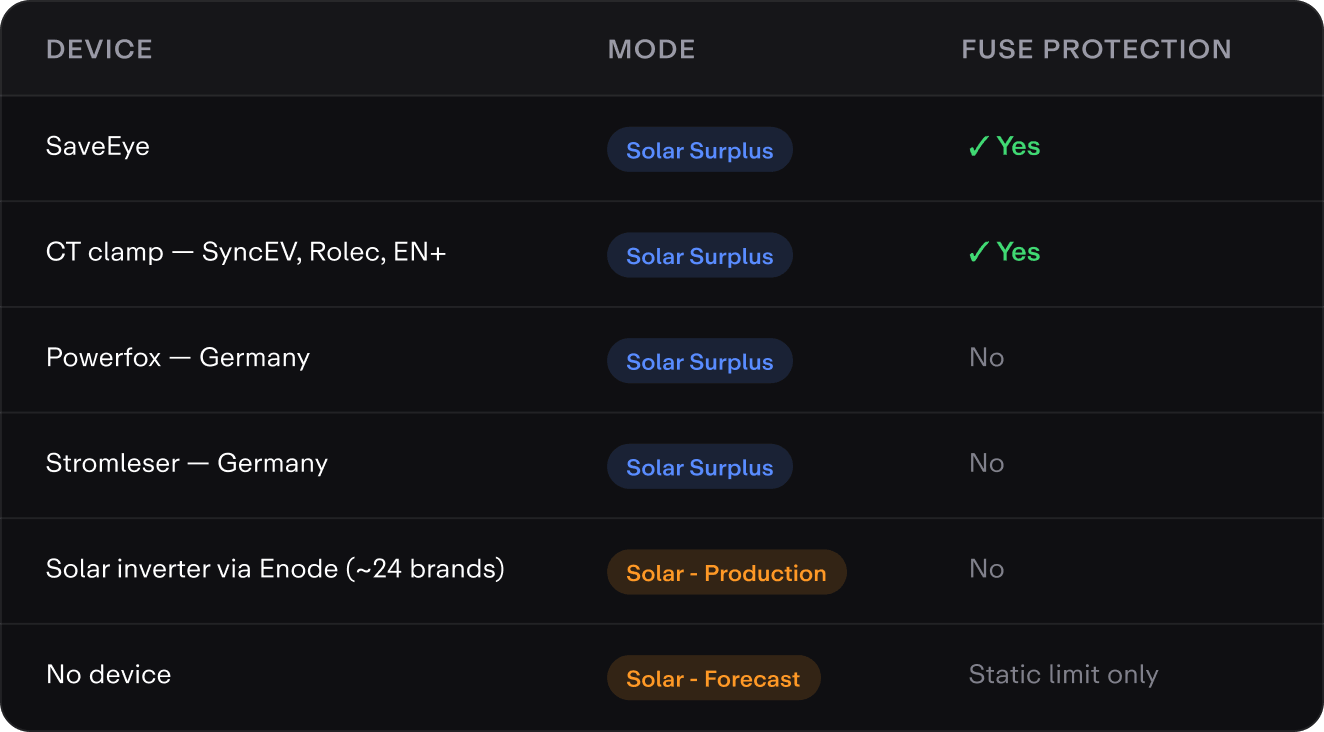
A SaveEye meter or a CT clamp serves SolarCharge and fuse protection from one connection. The German readers serve SolarCharge only — check this column before promising a protection feature.
A CT clamp is fitted at the main supply and must be installed by a qualified electrician. Meter readers are self-install by QR code or serial number. The charge point itself must support SolarCharge — filter for it on Monta’s supported charge points list. A generic MQTT meter contract is also available for third-party hardware.
Driver-configurable settings

Solar + Grid
When surplus sits between zero and the minimum, top up from the grid to reach the current needed to keep charging. Recommended for smaller arrays, which spend more of the day below the threshold.

Solar Only
Charge only when surplus meets the minimum, for a 100% green charge. Below it the session stays open and waits rather than importing. Recommended for larger arrays.

Avoid battery discharge
Stops the car pulling from a home battery once solar surplus drops. A duty-cycle throttle: hold at 0 A for around five minutes, then lock for around an hour. Off by default; the lock time is configurable per home.

Always solar charge
New charges default to SolarCharge. An explicit per-charge choice always overrides it. Off by default.