
This article applies to North America only. For general guidelines, please refer to Set up a Payter payment terminal.
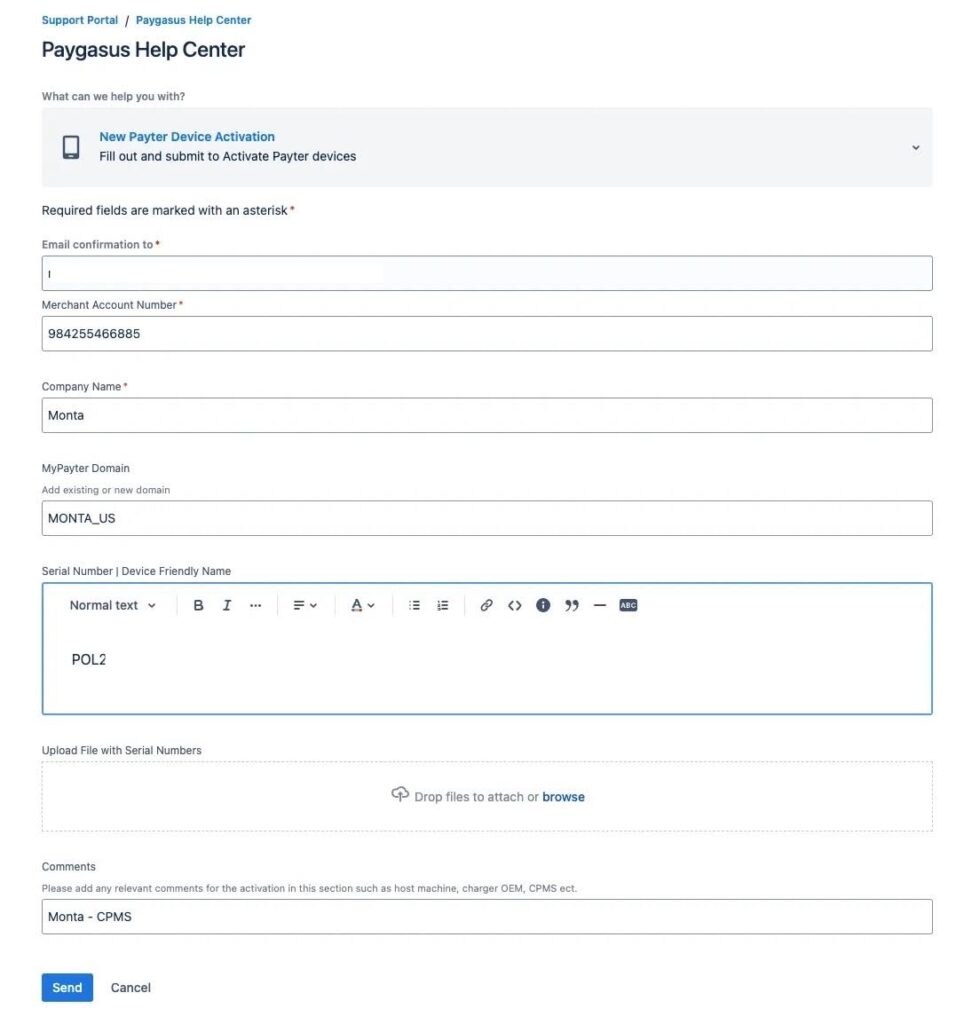
- Open this form and choose New Payter Device Activation
- Complete it with the following information:
- Email confirmation to: [This should be your email (the one managing the site)
- Merchant Account Number: 984255466885
- Company Name: [Your company name]
- MyPayter Domain: MONTA_US
- Serial Number: The serial number of the payment terminal(s) you are moving to Monta cloud solution.
- In the Comments, you can add “Monta – CPMS”
Note: You input Monta’s credentials because the payment terminal is getting added or migrated to Monta’s MyPayter wallet in order for us to reconcile payments for you, and pay you out inside Monta.
3. After 3 business days, you should receive an update from Payter on your request. This will confirm the Payment terminal has been moved over to Monta’s wallet and you can proceed with the next step.
4. Using Monta’s Payment Terminal tool in the Hub, add the payment terminal to the charging site.
5. Perform a test charge to complete setup